Kingdoms End - Season 3 Rules
This document has been composed by the Council Of Leaders.
Discussed & Approved By The Arbitration Team
Written by Lucian V. Ghost
Titled by Alesan
Introductory story by Mackor
- Prologue
- General Rules
- Company Rules
- Raiding Guidelines
- Ship Limitations
- Pirates & Piracy
- Fleet Operations
- Rules Of War
- Game Arbiters
- Solo Players
- Griff's Law
- Role Play & Mods
- Hints and Tips
Prologue
The Story Of Kingdom’s End
Many moons had passed since The Crown had given permission for the expeditions to The New World. It had been a dire time, but many companies had taken up the mantle to journey into the unknown for the sake of happiness, wealth, and adventure. However, they had no idea what this would mean …
The once pleasant lands of the New World had become tainted with the events that had occurred there, as if with every brick they'd placed had somehow conjured a fresh horror. The mighty Kraken had arisen, a fierce Ghost Galleon had emerged from the grey ocean, and the many horrors of the dank and foreboding islands had wrought their special brand of evil across the world. All
of these heinous events had only one defender, the varied array of brave souls seeking a new home, not knowing the truth of the world they'd come to claim. They had formed themselves into many companies, and established their various colonies without realising that their hunger for new lands and exotic resources were beginning to encroach upon the evils in the New World.
Having fought bravely to defend their claims, their mighty wealth and material possessions meant nothing. A black and purple fog spread across the New World like an unhealable bruise. This fog brought with it all the unleashed sins of this world, striking down everything in its path with a plague that showed no signs of abating. Hundreds of alchemists and medical specialists from every company had worked diligently to try and combat this latest threat, but to no avail. They had even isolated and destroyed certain civilisations under the guise of trying to rid the world of this plague. Some companies had used the world's evils as a way to gain political or geographical supremacy, so as time passed even the most trusting of people found it hard to judge a company's motivations, and being so far from Kingdom's End, The Crown was powerless to intervene.
This is why they called it The Great Upheaval, as the surviving companies knew the New World had died, and their efforts were inept against the veracious torrent of evil pulsing from the oceans beyond the horizon. So, they fled the New World which had offered such promise, and under a fragile alliance they ventured out to uncover new lands to settle, hopefully beyond the reach of these evils. At the first sight of land, far away from The New World, this alliance began to crumble. People began turning on each other, arguing over claims, disputing how resources might be allocated, and it seemed the troubles of The New World had taken their toll on the survivors. At the extremity of the pioneering fleet, some ships had even turned on each other, and it seemed like even escaping death wouldn't secure the living. One such battle had lasted for many hours, and while some companies tried to save floundering ships and drowning sailors, many had been lost to the hungry swell of the ocean.
As more and more islands appeared, small groups of people began peeling away from the main fleet, some under good terms, some not. Some companies sought to trade with others once they established a new home, while others, so mistrusting and hateful, threatened to get revenge on companies they saw as greedy or duplicitous. They had hoped that The Crown would save them or send reinforcements and supplies, but they knew now, as they sailed away from each other, that the future was uncertain, but their own to make.
General Rules
The general rules are here to ensure that everyone has a good time. Don’t force us to create new rules by trying to find loopholes or workarounds, or by attempting to justify cruel or unjust actions through them. It will not end well for you.
We may try to incorporate game mods where we can, if these cause any issues they will be removed. One of the goals of this community server is to have a community, this is helped by focusing on interaction, and players will find that their lives are improved by working with or through other players. NO P.V.P. is permitted on the main trade hub island. Please be aware of your tame settings, you are solely responsible for your animals/silent crew and what they get up too.
Silent crew may not be used at any ground emplacement that would damage players or player owned stuff. If they must be used to guard against hostile NPC’s, ensure that their targeting has players switched off as well as anything that might be owned by players. This includes anchored ships! Building on the Trade Hub Island is restricted, so as to ensure a minimal amount of lag during trade event days. Building on the other islands in C2 is allowed in a limited capacity, so as to keep the lag down. Clean Ups of the Hub Cell happen twice a month, so keep an eye out for the announcement posts in the ARMCO Discord.
Companies and Solo Players may only construct a 5x5x5 area structure and a dock on Powerstone islands, as well as a singular small shipyard. They may also only have one of each type of ship docked at a Powerstone island for an extended period of time, so as to minimise lag and frame rate issues.
Company Rules
COMPANY LEADERS ARE RESPONSIBLE FOR ALL ASPECTS OF THEIR OWN COMPANIES, AND WILL BE HELD ACCOUNTABLE FOR THE ACTIONS OF THEIR COMPANY SHOULD ANY RULES BE BROKEN.
A company must have at least four Active players to be formed. In order to create a new company, the company leader must post the following form in the Company Registration channel in the ARMCO Discord.
-
Company Name: The name of the company you wish to form.
-
Leadership: The leading members of your company, and their discord tags.
-
Timezone: The main timezone that your company operates in.
-
Backstory: A believable RP backstory that tells the story of your company.
-
Company Status: The current status of your company, I.E. Active/Inactive/Recruiting
-
Flag: An image of your company’s flag.
The Council of Arbiters will then vote on the approval of the company. Once the company has been approved, the leader or leaders of the new company will be invited to the leaders discord channel, and kept up to date with all events, changes and updates to the server.
However, leading a company comes with a set of responsibilities.
As a company leader, you must keep a list of your players on hand, with their in game names, steam tags and discord tags at hand, as this will be necessary to ensure the rules are being followed. That document will also need to be provided to the Arbiters upon its creation.
You will also be required to make sure that the members of your company stick to the rules outlined in this document, as the in game Arbiters cannot keep an eye on everything.
During the first week of server up time we will only be allowing companies to claim one island each. The decay timer for inactive companies is two weeks. After a two week period, structures and ships belonging to inactive companies will be wiped from the game.
If you find an island that is obviously populated, but currently unclaimed, please allow for at least 24 hours of time to pass before attempting to claim it as sometimes companies forget to put gold in the claim flag. If you wish to claim an island that has already been settled we would also recommend talking to the leader of the company settled there before placing down a claim flag.
Should a company choose to split and become two separate companies, the new company will be required to refer to this document and create a formal registration for the new company, as well as being required to agree to all the above rules and regulations.
If a company becomes inactive for more than two weeks consecutively, all items, structures, ships and tames are forfeit and will be auctioned off to the highest bidder at the next trade fair. Any island claims that the company may own will be unclaimed to allow currently active companies to take over.
Raiding Guidelines
A raid must start with an announcement in the P.V.P. channel, and the attacking party must directly contact the defending party about the event, either in game or through discord, at least 1 hour prior to the actual fight. Ideally the two companies should discuss the raid beforehand, outlining things that should not be attacked (tame pens, etc.) and anything else. The default maximum loot a raiding party can take is all that can be contained within a small chest, but more may be arranged during the meeting. (See Griff’s Law for more information).
The attacker’s ship(s) and the defender’s structure(s) are not valid targets. Players may attack parts of either one as necessary, but not with the intent to destroy the ship/structure itself. I.e. you may break through a doorway on a ship but you cannot sink it via mortar fire.
If a ship does fire on the defenders, it then becomes a part of the raid, and the defenders are then allowed to attack the ship itself.
Be civil. The goal of a raid is to have some land based P.V.P. It is not meant to deprive a group of all their resources, or destroy their ships and structures, or kill off their tames and salt the earth. Nobody says you can’t go on a murderous rampage, but just make sure it’s fun for everyone, and that it doesn’t breach the rules of raids or agreements formed prior to the raid.
There are three ending conditions for a raid:
- The raid time expires. Raids may only last an hour at a default, however if both parties agree to it prior to the raid starting, it may last longer. (See Griff’s Law for more information).
- The raider’s ship raises anchor and leaves the island. Raiders may choose to move their ship (s) around the island, however if they raise anchor with the intention of leaving, the raid ends.
- Both parties come together to unanimously end the raid before the time expires.
To ensure all players stick to the rules of the raid, it may be overseen by an impartial Arbiter on a company leader’s request, so as to avoid any major disasters. The impartial Arbiter may choose to end the raid early if something happens such as a breach of the raid guidelines, or other general rules. If a resource box is broken in a raid, it must be fixed before the raid can continue.
Once a raid has been conducted against a specific company; that company may not be raided again by any other company for two days, and may not be raided by the company that first performed the raid for two weeks.
Raiding is not allowed during a time when the defending company is offline.
Ship Limitations
There are several ship limitations that will be imposed for Season 3.
The first will be that no company or person is allowed to construct or utilise shotgun or turtle ships. This means ships that utilise more than one tier of above deck guns, and ships that utilise structures to create armour out of the ships bounds. Both of these ships are pictured below, and if any server member is found utilising these ships, they will face serious repercussions.
Ships that utilise wheelhouses or “pope boxes” must have an access route into the wheelhouse that can be used by anyone, for example an open doorway or a ladder with an open trapdoor. These routes into the wheelhouse cannot be closed off from the rest of the ship, and must remain open at all times.
Example images to be inserted here
The following ship types will be limited in the following ways:
Galleon
Galleons may station silent crew on all sails and any cannon on the lowest deck, but may not have silent crew stationed anywhere else. Brigantines & Schooners will be limited on the amount of cannons they can have above deck.
Brigantine
- Full Lower Deck (12) + 16 Cannons Above Deck
- Upper Deck Cannon Arrangement: 4 Rear, 4 Front, 4 Each Side.
Schooner
- Full Lower Deck (10) + 12 Cannons Above Deck
- Upper Deck Cannon Arrangement: 4 Rear, 2 Front, 3 Each Side.
All Ships
All Ships will be limited to a maximum of 4 Ballista.
Torpedo usage is to be limited to a single schooner per company.
Pirates & Piracy
IF YOU AGREE TO PLAY ON THIS SERVER, YOU AGREE TO THE RISK OF BEING PIRATED, AND YOU ALSO AGREE TO THE FOLLOWING RULES RELATED TO PIRACY.
The Rules Of Engagement
As a pirate, in order to engage a vessel you wish to plunder, you simply need to fire a warning shot at the vessel, and be sure to hail them with a “friendly” greeting. This will signal to the vessel that they are now being hunted by pirates. If they choose to surrender, no further combat is necessary, however if they choose to flee or stand and fight, then you’ll have an exciting time on your hands.
The vessel you hunt may be escorted by a group of mercenaries, or a heavily armed warship supplied by the company that the vessel belongs to. You may end up fighting them off while the ship you hunt makes it safely to port.
Once the vessel you hunt safely anchors in port, I.E., the central trade hub or a company island, you can no longer pursue it, as it is then protected by the harbour authorities.
Remember, anchoring at a random island does not count as a port. You must be in a populated area with other ships or an easily identifiable harbour.
The Rules Of Surrender
Whether you’re a pirate or not, you can always choose to surrender, after which both parties cease combat immediately, regardless of ship condition or possible reinforcements.
In order to surrender in a battle, the ship surrendering must lower all sails, type in chat, that they are surrendering, and if possible, launch a flare.
Once a ship has surrendered, combat ceases and cannot continue unless agreed upon for RP reasons by both parties. (See Griff’s Law for more information.)
A ship may attempt to lure pirates into close range of their guns by lowering their sails, but not providing a surrender in chat. This comes under the understanding that if you have not actually surrendered, the pirates are allowed to continue shooting you until you officially surrender, or sink, whichever comes first.
The Rules Of Plunder
If a ship surrenders, there are rules as to what you can take from them, and how much. Looting should be proportional to the fighting undertaken to secure it, however you must leave enough resources aboard the plundered ship to enable them to make repairs and get home.
Tames are OFF LIMITS as plunder, unless the plundered party agrees to part with them for RP or other reasons. (See Griff’s Law for more information.)
Remember to not Stone Age someone through plundering. It’s not fun for the plundered company to have to climb back up from nothingness. Only take what you think is fair.
Anchored Piracy
There are instances, not often but occasionally, where a pirate may come across a ship that is anchored at an island in a location that is not considered a safe harbour. In this instance, it is possible to pirate these ships, however, there are very strict rules to adhere to in these situations.
In the event that a ship is found anchored at an island, the pirate will have the element of surprise. In this situation, the crew of the surprised ship may choose to either surrender, or fight the pirates in boarding action, I.E. Melee & Ranged Player combat.
In the event where the crew of the ship is not online, the pirates will be required to post in the ARMCO PvP channel that they intend to pirate the ship in question, specifically mentioning the name of the ship, one hour beforehand.
Once the crew has either surrendered or been defeated, the Rules of Plunder then apply.
Please note, explosive barrels, mortars or cannons may not be used on these anchored ships, as it is unfair to the crew of the surprised ship. Anchored Piracy is not allowed when the people being pirated are offline.
Fleet Operations
Fleet operations can be messy business, so in order to clear up any confusion on the subject, the following guidelines have been put in place to assist fleets and fleet combatants with various tasks and ideas such as methods of escape, terms of surrender and methods of repair.
In order to Escape a conflict, a ship must close sails & gunports after reaching a friendly port or island. Once a ship has closed sails and “Escaped” it cannot then enter back into combat once it has repaired. Once a ship has escaped, it is out of the fight permanently, until such a time as the fleet engagement is over.
For a ship to have properly escaped a fleet battle, the ship must reach a friendly port or island. If that island is not owned or operated by the company that ship is with, the ship must request Safe Harbour. This means announcing in global chat that (Ship Name Here) is requesting safe harbour at (Island/Company Name Here). Once the island owners reply a confirmation, the ship may then lower sails and come to a complete stop. Ships that have escaped the fleet engagement are not subject to piracy or the Rules of Plunder.
In order to Surrender a ship must close sails & gunports and announce in chat that (Ship Name Here) is surrendering. Once a ship has surrendered it cannot re-join the fight, and once the fleet engagement is over, it will be subject to the Rules of Plunder, should the company that the ship belongs to have lost the fight.
There are two methods of repair for a ship during a fleet engagement. One is to utilise a fleet tender to carry resources into the fight, for ships to pull alongside and transfer repair materials, ammunition and other resources across during the fight.
The other is for a ship to find an island, drop a few crew on to it, sail around for a bit and then pick the crew back up at slow speed once the crew has gathered resources and material necessary for repairs.
During both of these manoeuvres, the ships cannot be halted. No matter how slowly they may move, the ships must still be moving, otherwise they will be counted as surrendered and removed from the fight.
During a Fleet Engagement, only one Torpedo Schooner may be in the fight. If it is sunk, the company it belongs to may not launch a pre-prepared torpedo schooner during the engagement as a replacement.
Arbiter judgement may be called to ensure that specific ships are not breaching these rules.
Rules Of War
The Rules Of War are a subject of much contention and debate, and as such, the Arbiters have deemed it fit to leave these rules undefined. Instead, we ask the following.
Any company that wishes to go to war against another company, must do so under agreement of Griff’s Law. An arbiter will oversee that agreement and ensure that everything is decided in a fair and reasonable manner.
This means that no company may be forced to go to war, however this does not stop negative repercussions from happening, should a company refuse the war declaration. We encourage companies that would wage war to find alternative ways to engage the company they wish to wage war on.
This can be done by Trade Embargoes, Bounties of Piracy, Blockades, Bribery and other such methods to entice the other participating company or companies to engage in a war scenario. (These are examples b.t.w.)
The rewards for winning a war are completely dependent on the demands of the company that wages war, and the demands of the company that the war is being waged on. These can range from a takeover of an island claim to a portion of a company’s income being given to the winning company. The only limit to war is that, like with every other PvP event, it cannot Stone Age a company, nor evict them from the lands they live on, unless it is agreed under Griff’s Law.
Lastly, once a war agreement has been made, a declaration of war must be placed in the PvP channel in the ARMCO discord. Any battles or PvP events after this declaration must also be announced in the PvP channel, as well as the addition or retraction of allies to either side for the duration of the war.
Game Arbiters
Certain members of the ARMCO Community have been asked to act as moderators and dispute solvers for Season 3 of Atlas. These members are to be known as the Game Arbiters.
Game Arbiters should be the people contacted, should you have a problem in game. These problems can be anything from technical issues such as the sudden disappearance of ships and resources, to interpersonal issues such as arguments and disagreements between server members.
Please remember, that while the Arbiters will do their best to solve your issue, they may not always be able to. If they cannot, they may take it directly to a server admin if it is important enough.
Arbiters & Their Discord Tags
- Griffiths:
Griffiths#4288 - Spacebar:
Spacebar#0690 - Moldark:
Moldark#4736 - Nairou:
Zaphiel/Nairou#5281 - Grot:
DaBiggestGrot#0165 - Jack:
Captainjack1988#2510 - Lucian:
Lucian V. Ghost#7580 - Roger:
Roger York#8392 - Aya:
MidnightAyaChan#8483
Administrators
- Poetic:
PoeticInjustice#0156 - TBSliver:
TBSliver#6232
We don’t want to see any drama in any ARMCO Atlas channels. Please remember that your company leader should be your first point of contact in any situation, and should they not be able to resolve the issue, you should contact one of the above Arbiters.
Solo Players
Generally speaking, it is encouraged that players join one of the active companies on the server or create their own company with friends. However, if you do wish to take on the challenge of solo play, you can. If you choose to do so, please ensure to provide an Arbiter with your Discord Tag, In Game Name, Steam ID and SteamID64 so that we know who you are.
As a solo player, there are a variety of limitations that you will encounter, the major ones being the inability to claim an island and share your items, ships and tames with other people. If you get pirated and choose not to surrender, you may get sunk and you won’t have a company behind you to help recover your items, if the pirates don’t dive for them first. There are also limitations on alliances, and as you are not able to claim an island, finding a home may be difficult, though it is possible to ask specific companies about the possibility of renting or purchasing part of the land they own for you to live on.
You will also need to respect the following. When approaching an island owned by a company, please ask the company that owns the island, before anchoring there. You can do this by either asking in game, or through Discord, by finding the leaders tags in the Company Registration channel, for the relevant company. Most companies will be happy with you anchoring there, as long as they’re informed.
If a solo player has logged off for an extended period of time, and the ship that they pilot is in some way obstructing or impeding the operation of the company that lives on the island that the ship is docked at, the company may petition an Arbiter to move the ship, if they cannot reach the owner of the ship through conventional channels such as Discord.
If they seek to get in contact with a Solo Player, but cannot find them in discord, the Arbiters may share the discord tag of the player in question with the company leader that is trying to contact them, so as to avoid confusion.
Companies must give a one week grace period to allow the Solo Player to move their ship before petitioning an Arbiter to action.
Griff's Law
All agreements between two or more companies supersede server rules for those specific companies, PROVIDED that the agreement was made in public, i.e. discord chat, and/or was overseen and evidenced by an impartial Arbiter.
Role Play & Mods
Role Play
This server is made with the intent of light RP. You can RP if you wish to but it isn’t a requirement. If you interact with a person/company who wishes to RP then feel free to do so back but if you aren’t comfortable with it then you don’t have too. An RP backstory is not required for character creation but is advised. You must have a short RP backstory if you wish to set up a company.
Mods
The Kingdom’s End Server utilises the following mods to provide cosmetics to the server. Please note that if any mod causes server issues, it may be removed without warning, and this may cause items or structures from that mod to disappear. If a mod is found to be causing problems and is removed, the Arbiters will do their best to help you recover any lost items.
Hints and Tips
ATLAS Downgrade and Stop Upgrades
Sometimes, the ATLAS update will break certain things in the server, which will mean that we will keep the server version back temporarily while things get fixed or the Arbiters decide on the next step for the server. This means that, if you accidentally upgrade your ATLAS install, that you will not be able to access the server. But don't worry, we have a solution! Follow these instructions to fix the issue.
Stop Upgrade
To stop ATLAS from upgrading, you need to change a setting in your ATLAS properties in Steam.
Step 1
Right click on ATLAS in your Library then select Properties
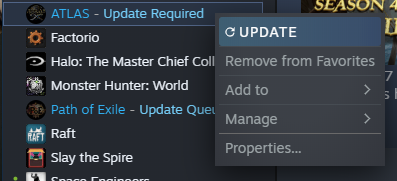
Step 2
Go to the Updates tab, and change the setting to 'Only update this game when I launch it'
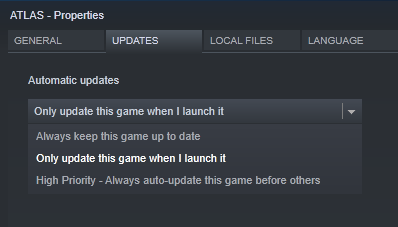
Step 3
Go to the Local Files tab, and click Browse Local Files...
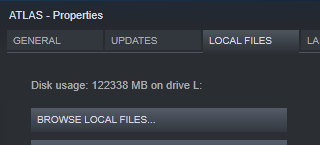
AtlasGame.exeAtlasGame_BE.exe- ATLAS with BattleEye
Or, right click and create a desktop shortcut for your chosen one. You will need to start the game with this shortcut, instead of using the Steam Library.
(Optional) Step 4 - Low Memory Mode
If you need to launch ATLAS in low memory mode, create a desktop shortcut, then right click the new shortcut and select properties. In the Target box, add -lowmemory at the end, then click OK
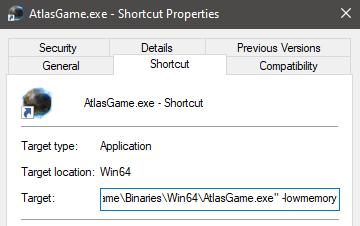
Downgrade ATLAS
To downgrade ATLAS, you will need to install a couple of pieces of software - this used to be possible through the Steam Console, but they changed something so that method doesn't work any more. (Specifically, they blocked downloading old manifests, for those interested).
These instructions assume you own ATLAS on the account you are using later on - If you do not, then this will not work. Piracy is bad, mkay?
Step 1 - .NET Core
Download and install the latest .NET Core runtime. This can be found here: Download .NET
You will want to click the "Download .NET Core Runtime" button, and then the "Download x64" button.
Step 2 - Depot Downloader
Download the latest version of the Depot Downloader here: Depot Downloader latest release
Click the zip file in the release page to download it (at time of writing, depotdownloader-2.3.6.zip):
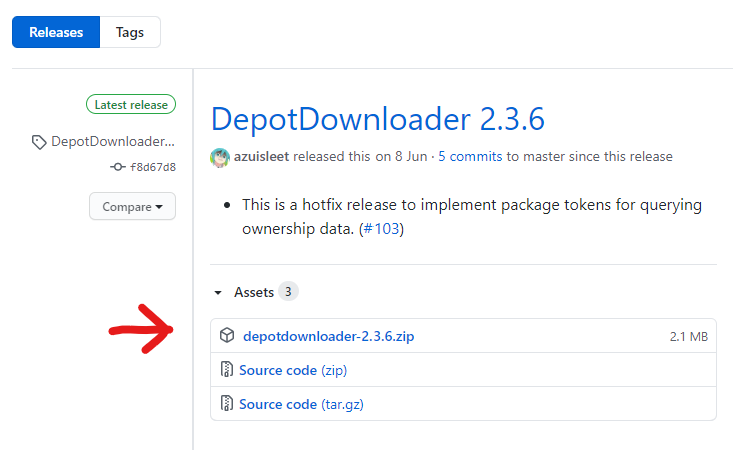
Unzip somewhere sensible, you will need the contents of this zip file for the future steps
Make sure the disk where you unzip Depot Downloader has enough space for ATLAS as well! At time of writing, this is ~123GB
Step 3 - Opening a Shell
Now you will need a CMD window or a Powershell window open. You can open these by:
- Pressing Win+r to open the Run dialog
- Right clicking on your Start Menu Button and clicking "Run"
- Or, on Windows 10, pressing the Start Menu Button/Windows Key
Then typing cmd or powershell. This will open one or the other of those programs.
If you type dotnet then press enter, you should see some help information like so:
Usage: dotnet [options]
Usage: dotnet [path-to-application]

Options:
  -h|--help         Display help.
  --info            Display .NET Core information.
  --list-sdks       Display the installed SDKs.
  --list-runtimes   Display the installed runtimes.

path-to-application:
  The path to an application .dll file to execute.
This means that you have installed .NET Core correctly, and are in the right place!
Step 4 - Locating the Depot Downloader
Now you will need to navigate to where you unzipped the Depot Downloader using the cd command. If you unzipped it into your downloads folder, then running the following will get you to the right place:
cd Downloads\depotdownloader-2.3.6If you unzipped it anywhere else, change the folder name as needed.
Optional Step - Copy ATLAS Files
You can optionally copy your current ATLAS Game directory into the folder that Depot Downloader will use. This will work with an already updated ATLAS Game, and will speed up the downgrade.
To do this, create the folders depots\834911\5217219 inside the Depot Downloader directory, then copy the contents of your ATLAS game folder into there. This means that, you have the ShooterGame, Engine, and Tools folders inside depots\834911\5217219.
Step 5 - Downloading ATLAS
The final step here is to download ATLAS! You will need your Steam Username, Password, and if you use it, your 2FA to perform this step.
Run the following command, swapping MyUsername with your own steam Username.
dotnet DepotDownloader.dll -app 834910 -depot 834911 -manifest 2520647299836549642 -username MyUsername -remember-passwordYou will be asked for your password, so enter it where it says (no characters will appear as you type, so be careful!) And if you have 2FA enabled you will then be prompted for your 2FA code.
After that, it will start downloading the files! Now you wait...
Step 6 - Play ATLAS
Now you can play ATLAS again! You will find the files in depots\834911\5217219, and can launch the game using one of the following executables:
ShooterGame\Binaries\Win64\AtlasGame.exeShooterGame\Binaries\Win64\AtlasGame_BE.exe- With BattleEye
You can also add this to your Steam library as a non-steam game if you want to.
Paintings and Saved Character Settings
Note that as this is a different installation, you will not have any of your saved paints or character setups - you will need to copy those from your main ATLAS installation to retrieve those. These can be found in your old installation at:
ShooterGame\Saved\MyPaintings- PaintingsShooterGame\Saved\SavedAtlasLocal- Character Settings (for new Characters)ShooterGame\Saved\NewMapImageCache- Map images